Reviewed 29 October 2026
Punch to Escape Upgrades & Robots Guide
Find the robot upgrade station and choose purchases around breaking, collecting and selling bottlenecks without relying on unverified price lists.
Browse by task
05 guides
Plan your escape
Build a work loop and respond to searches.
- Punch to Escape Beginner Guide & ControlsA practical first-session route through punching, vacuuming, selling and returning safely during guard searches.
- Punch to Escape Guards: Cell Search Warning GuideWhat the red cell-search warning means, how to respond to the countdown and what to check before returning to work.
- Punch to Escape Upgrades & Robots GuideFind the robot upgrade station and choose purchases around breaking, collecting and selling bottlenecks without relying on unverified price lists.
- Punch to Escape Room Progression & Stuck Objective HelpHow to interpret the wall-clearing objective, look for remaining blocks and respond when a new room opens.
- Punch to Escape Codes: Current Verification StatusNo working codes or redemption menu are confirmed for DomBlox Games’ Punch to Escape as of 29 October 2026. Avoid codes for similarly named games.
Quick answer
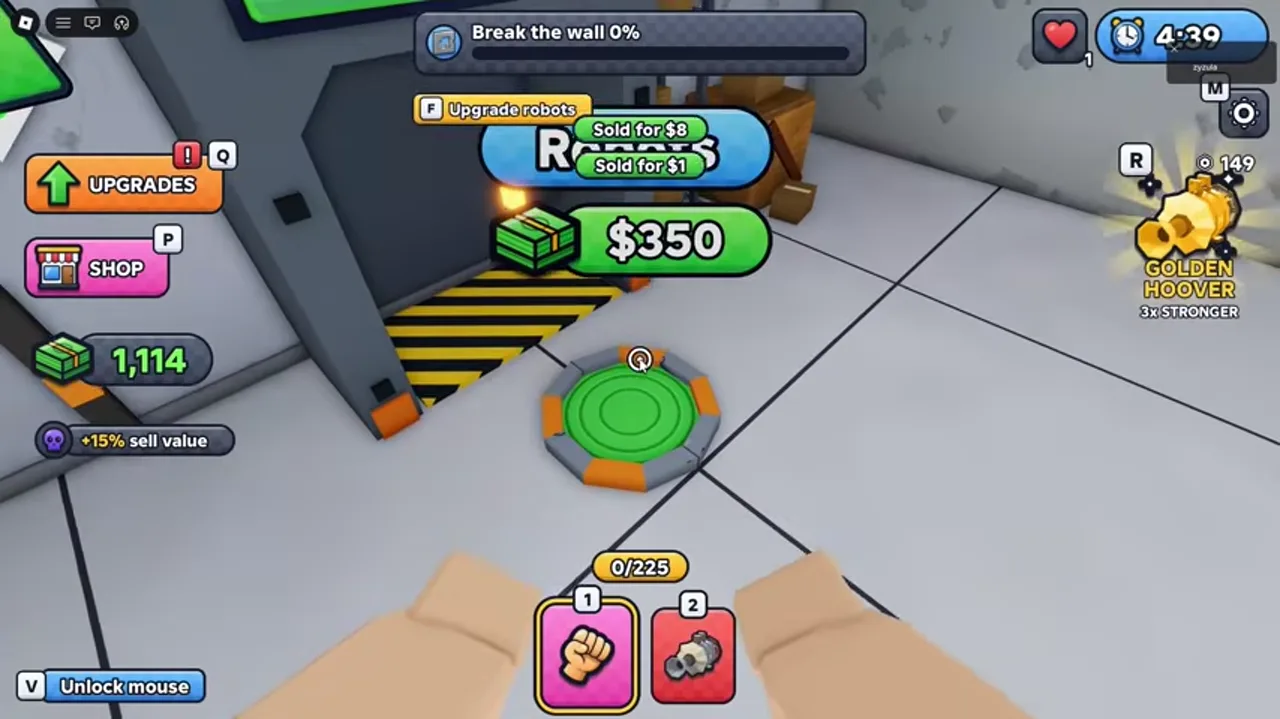
Use your earnings for upgrades and robots. The reviewed gameplay shows a Robots station with a contextual “Upgrade robots” prompt. Choose your next purchase by the stage that currently slows your work loop.
§Find the Robots station#
Look for the Robots station and approach its interaction area. In the reviewed PC footage, a prompt reads “F Upgrade robots”. The station also shows a dollar price. Read the current in-game menu before spending.
The observed price belongs to that recording and progression state. It is not a verified universal unlock cost. A complete robot list, unlock order and automation behavior still need direct verification.
§Choose by your current bottleneck#
If wall breaking takes most of your cycle, inspect the available punching upgrades. If collection takes longer, inspect vacuum-related upgrades. If you repeatedly stop collecting because the bag is full, compare capacity-related options in the live menu.
These are decision rules for reading the current upgrade menu. Exact upgrade names, level caps and cost scaling are not confirmed, so this guide avoids a fabricated best-buy order.
More details and limitations
2 sections§Read visible modifiers carefully#
The recording shows modifiers including sell value and vacuum intake. These labels help explain why two players may collect or sell at different rates. Check the modifier text in your own session before comparing results.
A percentage displayed in one player’s recording does not prove the base effect or how multiple bonuses stack. Compare one purchase at a time if you want to measure its effect on your loop.
§A simple spending checklist#
- Sell your collected rubble first and check the available cash.
- Open the upgrade menu or approach the robot station.
- Read the price and the actual effect shown for your next level.
- Choose the effect that addresses your slowest stage.
- Return to one work cycle and compare the result before buying another level.
- During a cell-search warning, return first and postpone shopping.
Scope and sources
Guide scope
- Based on DomBlox Games’ official description and a reviewed community gameplay recording. We have not tested the game ourselves. Menu values and controls may change with updates.